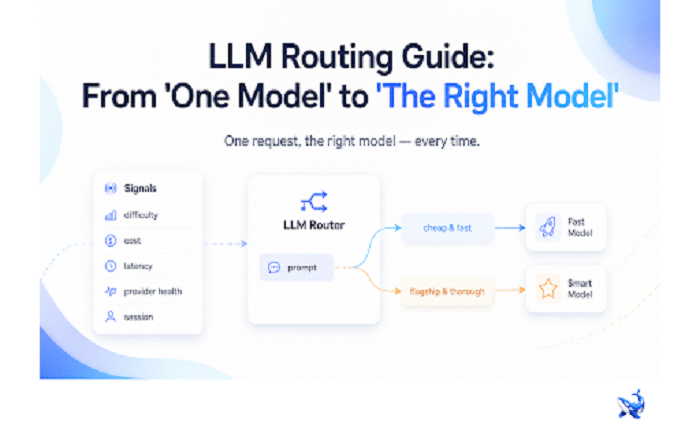
An llm router layer sits between your application and the model market — it reads each request and decides which model answers it. When you weigh which models to move between, a mid-tier like GPT-5.6 Terra shows how the switching cost varies; this guide is about the adoption decisions that come before the wiring: which signals to route on, what changes once you turn routing on, and the failover chains, caching, and observability that keep it honest.
Most teams don’t have a model problem — they have a single-model reflex. One flagship, one contract, one endpoint, and every request, from “summarize this email” to “refactor this codebase,” pays flagship price and flagship latency. LLM routing breaks that reflex. It treats the model catalog as a portfolio and matches each prompt to the cheapest model that can still answer it acceptably — but the savings arrive only if you get the signals, the operations, and the failure modes right.
The five signals an LLM router reads
Routing is a classification problem in disguise: given this request, who answers? Every router encodes the same five signals, though implementations weight them differently.
- Prompt difficulty. This is the core of routing by difficulty: is the task trivial or hard? A router scores each prompt before sending it anywhere. OrcaRouter grades every prompt in under a millisecond before routing it [OURS], so the classification adds essentially no latency to the request.
- Cost budget. Per-token price. Models vary by orders of magnitude in price per million tokens for the same quality bar. A cost budget says: within these quality bounds, minimize price.
- Latency budget. How long may the answer take? Chat and voice demand a low time-to-first-token; batch and background jobs can wait seconds. A latency budget sends interactive traffic to fast models and lets slow-and-thorough models handle offline work.
- Provider health. Models live on providers that rate-limit, degrade, or go down. Health signals — timeout rates, error codes, queue depth — are the trigger for routing around a failing provider. The router should notice before your users do.
- Conversation context and session state. The newest and most underused signal. Modern routers are context-aware: they read the session, not just the single prompt — how many turns have passed, what the conversation has accumulated, how much of the prompt is a shared prefix. That turns routing from per-request to per-conversation: escalate to a stronger model when an agent goes deep, keep cheap models in charge of trivial exchanges, and route long shared prefixes straight into a cache. Session-aware, prefix-aware routing is the difference between routing that saves money on isolated prompts and routing that behaves intelligently inside a real product.
Before and after: one flagship, then routing by difficulty
The fastest way to see whether routing is worth it is to run the exercise on your own traffic: take your requests, split them into easy and hard, and price both ways. Here’s a typical assistant workload, priced before and after.
| Request type | Before: one flagship | After: routing by difficulty |
| Email drafts and short replies | flagship output price | compact model |
| Ticket classification | flagship | small classifier-grade model |
| Ambiguous support question | flagship | mid-tier model |
| Multi-file code refactor | flagship | flagship — the router escalates |
Before, every row is billed at flagship output rates. After, only the genuinely hard rows are. The flagship still does the hard work — the router just stops sending it the easy work. That’s the entire trick, and it’s why the grading step is the heart of a router: get difficulty wrong in one direction and quality collapses; get it wrong in the other and you’re back to paying flagship prices for everything.
The operational side: failover, caching, observability
Routing multiplies the models you depend on, which multiplies your failure surface — unless you build the operational layer at the same time. Three pieces, none optional:
- Failover chains. When the router’s first choice is down or rate-limited, the request has to go somewhere else automatically. This is what makes routing more reliable than a single model, not less. Automatic failover is a built-in feature of OrcaRouter’s routing [OURS], and it should be a precondition of yours.
- Caching. Prompt caching at the router layer pays off fastest where the same context is re-read — a long system prompt, a shared codebase, a big document. When routing is also session- and prefix-aware, those shared prefixes are exactly what gets cached, turning repeat work into a fraction of its original cost.
- Observability. With several models answering, you need to know who answered what, at what latency, and at what price. Request logs — an auditable record of every request — turn “which model handled this?” from a guess into a query. Per-request observability is what keeps a routed system audit-ready [OURS].
Three mistakes that quietly eat the savings
Routing fails in predictable ways. The three most common:
- Routing everything to the cheapest model. Cost is a constraint, not a goal. Send every prompt to the cheapest model and the money line looks great while quality silently collapses — the routing is working as designed and the product is getting worse. Cheapest-first only works when a difficulty grade stands in front of it.
- Ignoring latency tails. The average is a lie for interactive traffic. A model whose p50 time-to-first-token looks fine can still have a p95 that breaks your UI. Set the latency budget where the tail lives, and route on it.
- No fallback. A router with a single provider upstream is just a detour — when that provider has an outage, every routed request fails together. The reliability argument for routing rests on the fallback being automatic, pre-arranged, and tested before it’s needed.
Before you finalize a policy, run it against your own traffic rather than a synthetic sample. The difference between a routing rule that looks good on paper and one that survives a real week of requests is usually measurement: cost per completed task, p95 latency, and error rate across the chain. Whatever signals you choose, keep them visible and revisit the rules monthly — routing is a tuning problem, not a set-and-forget config.
The takeaway
Routing fits teams that send a mix of easy and hard requests to a single model — which is most AI products — and it pays off fastest where volume is real, because savings scale with the traffic you’re misallocating. It’s a poor fit for a single, uniform workload served by one model, where the added layer buys nothing. The decision procedure is short: split your traffic by difficulty, price both halves, and see what the router would have spent. If the gap is meaningful, wire it up with failover and logs from day one. OrcaRouter bundles the plumbing — one API key for 200-plus models at 0% markup, with vendor list prices passed straight through — so the experiment is cheap to run [OURS].
Sourcing note: All OrcaRouter product claims — prompt grading in under a millisecond, one API key for 200+ models, 0% markup pass-through of vendor list prices, automatic failover, per-request observability, and session/prefix-aware routing — are OrcaRouter’s own published claims on the OrcaRouter homepage and product pages, checked August 22, 2026. The signal list, before/after example, and common-mistake list are general engineering guidance, not product claims.